
Computational photography has long been a staple of smartphone photography, enabling tiny sensors to punch above their weight and perform some neat tricks, but is the technology at the point where it can replace traditional methods of photography?
One of the most intriguing uses for computational photography for me has been the ability to simulate long exposures. Olympus/OM System has long been a backer of this approach with its simulated ND filters built right into the camera, going so far as to add a computational photography button to its new OM-3. The iPhone has also long had this same feature, utilizing its Live Mode capture to simulate dragging the shutter by combining images from the short video frames it grabs around the still photo.
There are a lot of advantages to this approach, in that you don't have to lug around heavy cameras and ND filters, but also in that you can activate the feature in almost any lighting or time of day—something that's not necessarily possible with a mirrorless camera/ND filter combo without some preparation and planning. For instance, you may find that even a strong ND filter may not cut enough light to the sensor for the shutter speed you're trying to achieve. On the other hand, the iPhone doesn't give you a choice on shutter speed (and unfortunately doesn't note the simulated shutter speed in its metadata).
iPhone vs. Low-End Camera
But enough about the intricacies of how it works. How does it actually look? For this photo, I pitted the latest and greatest iPhone, the 16 Pro, against a low-end mirrorless camera and so-so super-zoom lens, the Canon EOS R50 paired with a Canon RF-S 18-150mm f/3.5-6.3 IS STM lens (not the R5 used for illustrative purposes in the image above, though it, too, was shooting long exposures perched dangerously on those rocks). I used a high-end 10-stop B+W ND filter to drag the shutter on the Canon, mostly because that's what I had, and I certainly could not afford to lose more image quality on the 18-150mm, which already makes some compromises to cram a large range into a small footprint. Spoiler alert: I'll reveal which photo is which directly below, so don't scroll too far down if you want to take a guess first. I'd also encourage you to look at this on a computer and enlarge the photo to see all of the details.

Both photos were framed and cropped as closely as possible, and both the phone and the camera were on a tripod so there would be no movement. Both photos were taken with each camera's self-timer so no camera shake would be introduced with my hands, either. Finally, I edited the colors to be as close as possible, though in full disclosure there was not much flexibility in the iPhone's files, as long exposures produce a JPG that doesn't have the editing capabilities of a raw file from a mirrorless camera.
So which one is which? The photo on the left is the iPhone, with its computational photography producing the long exposure, while the photo on the right is the Canon mirrorless camera.
Viewed small on the phone, you'd be hard pressed to tell the difference. In the least scientific of polls, I publicly asked my photographer friends on Facebook to take a guess and explain their answers as to which one was which. Ultimately, most were able to figure it out if they looked at it on a big screen. As was pointed out by my network of photographers, when the photo is enlarged, you can see some choppiness in the water for the photo on the left, as if it's mashing several frames together. In general, the rocks aren't very sharp in the iPhone photo, and the iPhone photo applied a little HDR magic to retain the blue in the sky. Here's a close-up crop of the photos where you can really see all of that in action:
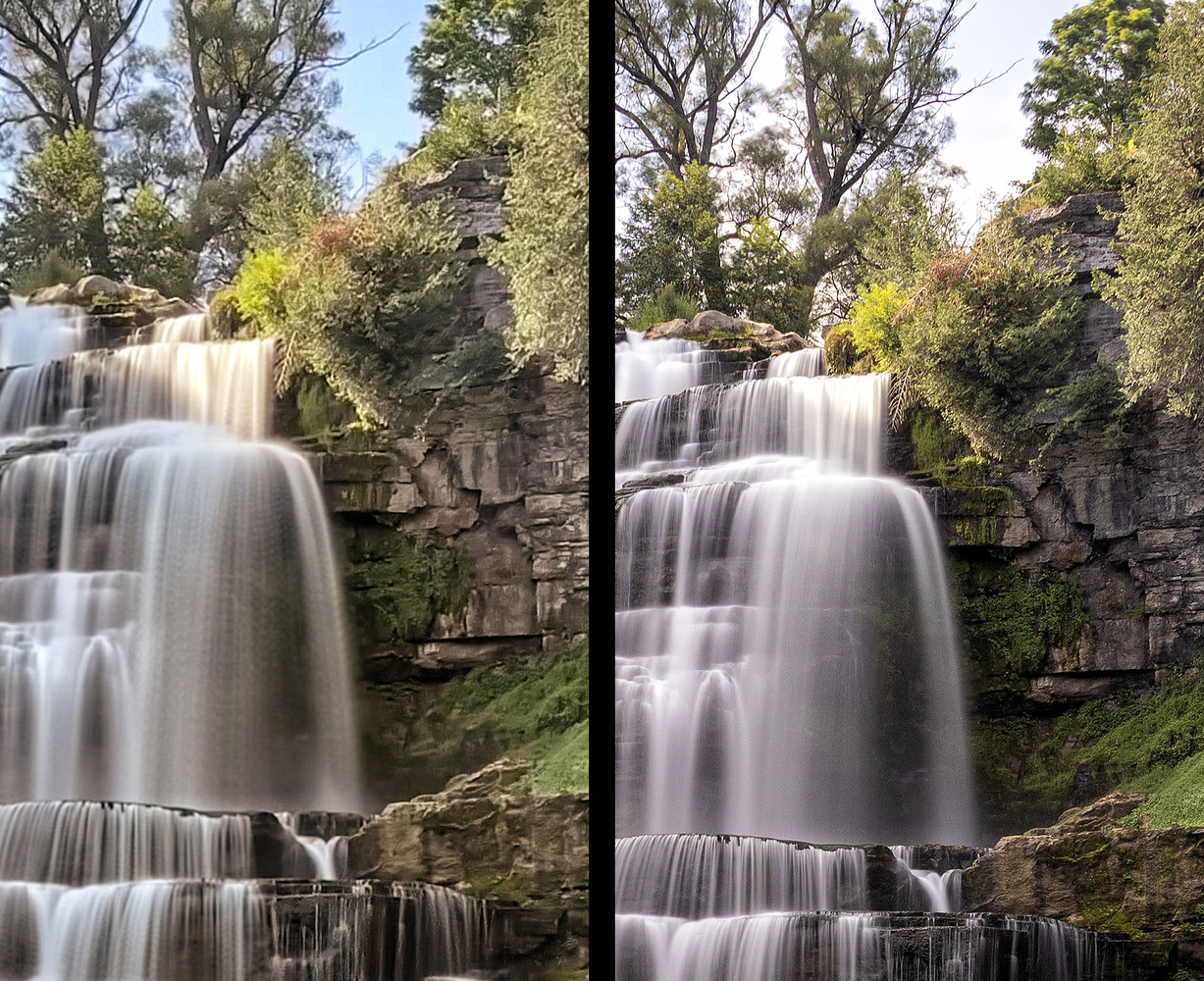
While there is some wicked purple fringing from the Canon lens, there's tons more detail and clarity in the image than the iPhone's Frankensteined long exposure comes up with. The exposure on the Canon was ISO 100, f/8, and 10 seconds.
Does any of this matter? Maybe not if you're just looking at things on a small phone screen, or if your audience is doing that. But if you care about quality at all, it looks like you may have several more years of carrying that bigger camera setup with you.





It’s surprising how good the phone photo looks out of the box. Definitely more than enough for most digital viewing by most people. Photographers often forget how little attention the average person pays to the type of things we agonize over.
What a time to be alive. Three cameras in my pocket basically 24/7, basically endless proper cameras and lenses that effectively perform magic compared to the film point and shoot I grew up with.
Plus I still have the film point and shoot for when I’m feeling nostalgic!
Edit: Sorry, Sean, didn’t mean to trigger you 😂
Try Live Comp from OM and tell me it isnt a gamechager.
I am watching the photos on my iPhone and right off the bat, I preferred the Canon photo, because of the contrast and dynamic range. But what made me confused was the movement blur of the foliage. I thought with a 10 second exposure, the foliage will show more blurriness due to wind movement. If there was no wind, why does the iPhone foliage show so much movement blur?
I've been trying to figure that out myself. I think the computational stuff is still a little wonky, I guess.
It's not about the photo for me using a camera for long exposures means getting the filter out taking my time taking it all in when I go out and take landscape photography. I turn my phone off to disconnect from the world. I've never seen anyone put their phone into Aeroplane Mode when they are taking photos. The constant messages coming in from your platforms. Text messages and phone calls ruins the moment for me. this is why I don't do phone photography. It's not about the photo. It's about the disconnection process that I need to immerse myself in an environment and yes I shoot landscapes professionally so I do want very good high-quality printable images and yes you can print from an iPhone but it's not the same as a GFX camera with all due respect. Many people look at the photo as the objective I don't for me. The objective is to immerse myself in the landscape and the photo is the resultant byproduct of that emergency process.
Even on my cell phone it was very easy to identify the real camera from the i phone.
The poor quality of the waterfall is easily seen. As to color it wasn't discernable on the cell phone as they both were quite different.
As you noted, i phones are still way behind real cameras and will continue to be so for some time to come. As camera sensors also are advancing.
The law of physics are what they are.
The awful sky in the iPhone photo was the first giveaway for me. Zooming in differences became more clear. But I have to say the iPhone photo is not bad for a phone. But I'm also wondering if the Canon photo was an edited raw, or straight out of camera jpeg? If edited, then the camera (or editor) is not very good, cuz the results I get from my old micro 4/3 camera I bring on bike rides cuz it's light blows my phone pictures out of the water (I always take a phone pic also to get GPS location to add to the Olympus photo).
Honestly I don't get the "phones are punching above their weight". They're not. The IQ is awful, universally. If you take candid people shots in the pub, sure, who cares. But no credible photographer really believes it, surely? I could see, on my phone, from a quick glance, the iPhone image. It's blurry, stuttered and lacks micro contrast and sharpness. My 5D2 outperforms that on a kit lens.
The one on the right is so obviously better on a computer screen I was actually saying to myself ..."please don't let the iphone be the one on the right...." :-D Even on a phone, the left pic just has that HDR-like "sheen" that is the hallmark of computational photos.