
Yes, there's really a rock in the shape of a heart in Joshua Tree National Park! This is the story behind this night photo, including how I went about lighting it.
What Is Light Painting?

I lit Heart Rock in Joshua Tree National Park using a technique called "light painting." This phrase is often used loosely to describe any addition of light to a night photograph. Really, though, light painting refers to a technique that uses a handheld light source to illuminate a scene during a long exposure. Your flashlight is your paintbrush, and you are quite literally painting the scene with light. Similar to a film director, you control what you illuminate and what you keep in shadow using your handheld light. Night photographers have used this technique for many decades.
I like handheld light painting because it's not only the most creative form of photography I can think of, but it's also quick, doesn't require setting up lights on stands, is flexible and versatile, and requires very little equipment.
Set the Controls for the Heart of the Rock
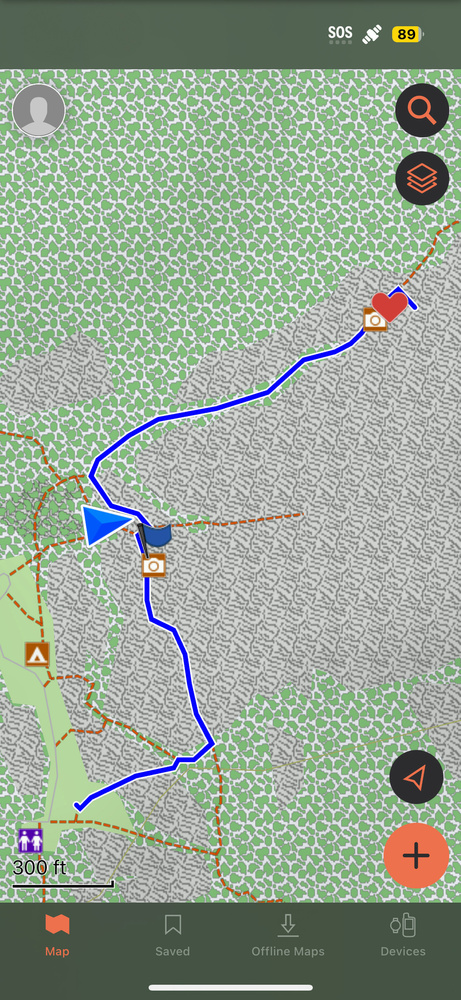
I was in the middle of testing an app called Garmin Explore, a free navigation app that allows you to pinpoint specific locations and shows common hiking trails. As night was drawing near, I walked from the White Tank camping area parking lot to the Heart Rock, a relatively short walk of probably no more than about a mile.
Using the app, I was able to navigate without the benefit of cellular data. And yes, I downloaded the map of Joshua Tree before I left the house. Since then, I've used it six times, and it's navigated flawlessly every time!
The path also leads to the famous Arch Rock, a magnet for night photographers when the Milky Way is out. A guy sitting in a camping chair saw me walking with my tripod and my backpack and shouted, "There's at least eight photographers ahead of you who are already there!"
I smiled and said thanks. But I was continuing on farther, hoping that no one was at Heart Rock. I needn't have worried. I had the entire place to myself for several hours.
Light Painting Heart Rock
Remarkably, the rock is picturesque and heart-shaped on both sides, so much so that when some people see this rock on social media, they think it's an AI-generated image.
For this last photo of the evening, I decided to light paint Heart Rock red. You know, because, why not?
I triggered my camera. Then I ran to the left side of the rock, which is probably good since if I had run to the right, I would have fallen several feet into a crevice. I had a 15-second exposure going and hadn't set the delay timer, so I had to be quick.
I used a dim red light from my ProtoMachines LED8 RGB light painting device so I could use several different strokes, applying the light very carefully so that it would be evenly illuminated, reducing the chance for hot spots. This is especially important since I was using a high ISO of 4,000. But it's also important because a dim light is far less obtrusive to animals or people, should they be around.
I set the camera to photograph 25 photos in succession, all at 15 seconds each. Why? I figured I'd throw the photos into Starry Landscape Stacker and blend them into one photo. This would allow me to have a nice, clean sky without having to use noise reduction. I like the way it looks a little more than applying noise reduction to a single exposure. Note: PC users can use Sequator, which is similar to SLS.

On my walk back, I heard many voices coming from Arch Rock, as well as many lights being waved about. It sounded like there were many more than eight people. I like people, of course, but not large crowds of people when I am creating night photos.



excellent post
Thanks! So glad you like it. I try to do at least one article that's sort of a "how this photo was made" that features light painting, just so it helps people out even though they don't really get a lot of hits.